Features
Everything in The PR Assistant, from setting up a client to sending the work.
How it works
Three steps, and the second one is the campaign.
1
Set up your client once.
Add a voice sample, a boilerplate, key messages and your spokespeople. Every draft after that sounds like them and quotes the right people.
2
Run the campaign.
Follow a guided workflow from brief to plan, or open a single tool for a pitch, a release or a statement. The plan lands in your campaign as a checklist you can tick off.
3
Send work you're proud of.
Writing Review reads each draft the way an editor would, so hype, weak quotes and missing details get fixed before a journalist sees them.
Campaigns
The plan you tick off.
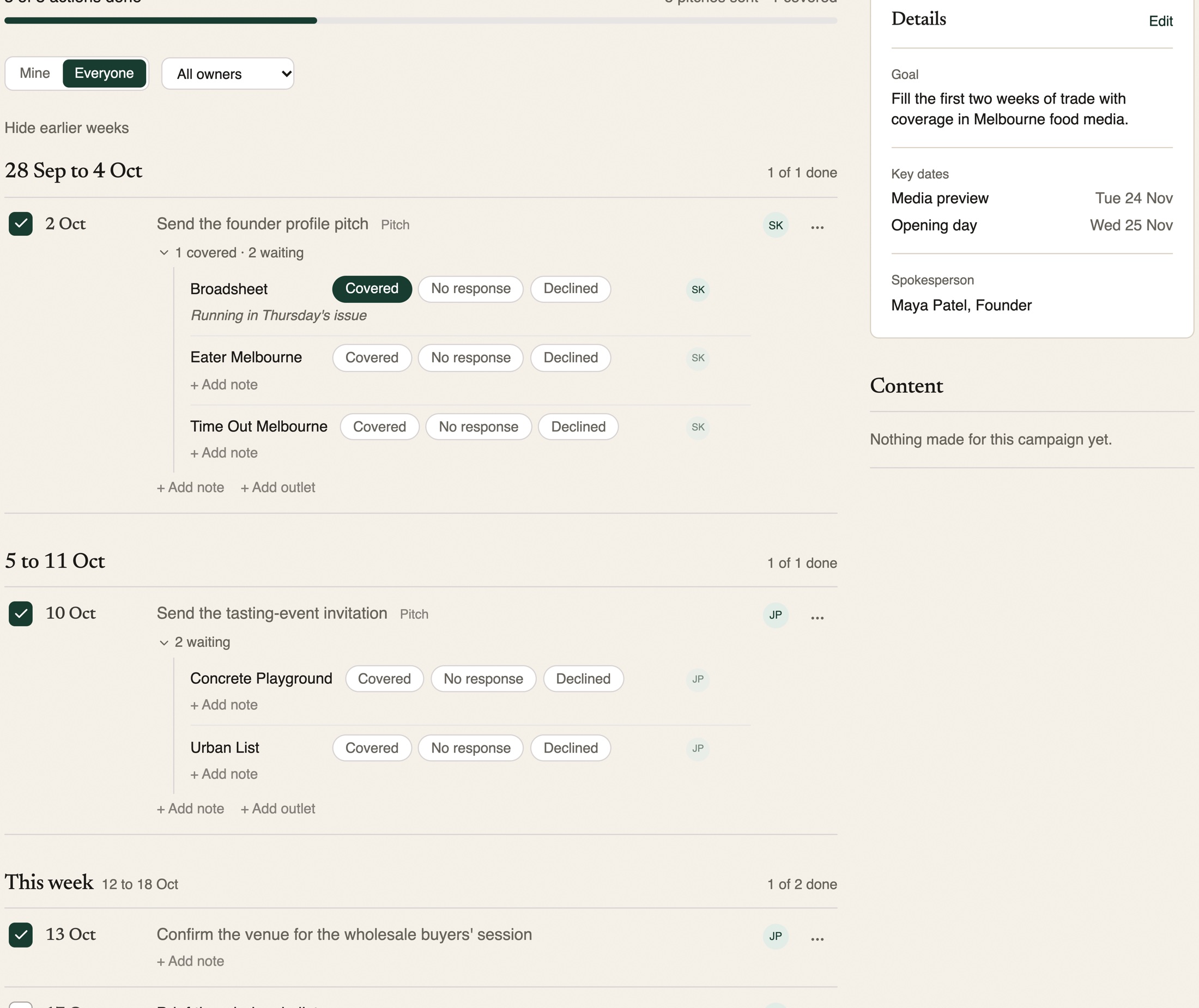
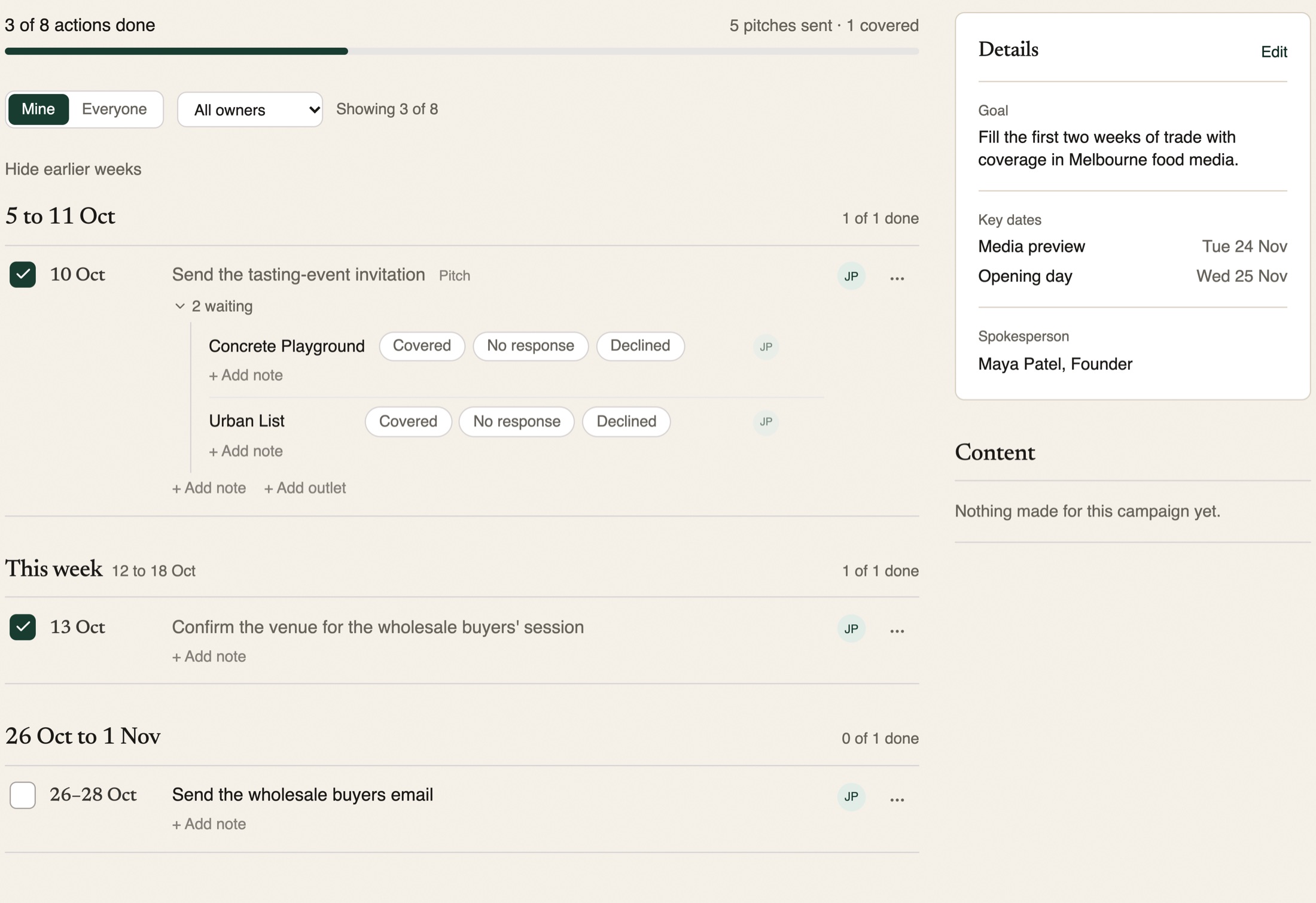
Every campaign has one page. It shows the countdown to your key date, the plan week by week, the documents you made and your notes. Overdue actions sit at the top, where they are hard to miss.
Who is on what. Give any action, or any single outlet, an owner. Filter to what is yours, or see everyone's.
Outcomes per outlet. Mark each outlet Covered, No response or Declined, with a note. A pitch to four outlets has four results.
Say what changed. Type "Opening day moved to 2 December and we sent the Broadsheet pitch yesterday" and review the updates before anything changes.
A record of who did what. Every change is listed in Activity, with an Undo link.
Guided workflows
Step-by-step help for the jobs that come round again.
Each workflow asks you for what it needs, one step at a time, and builds on your earlier answers. The plan it produces becomes the checklist in your campaign.
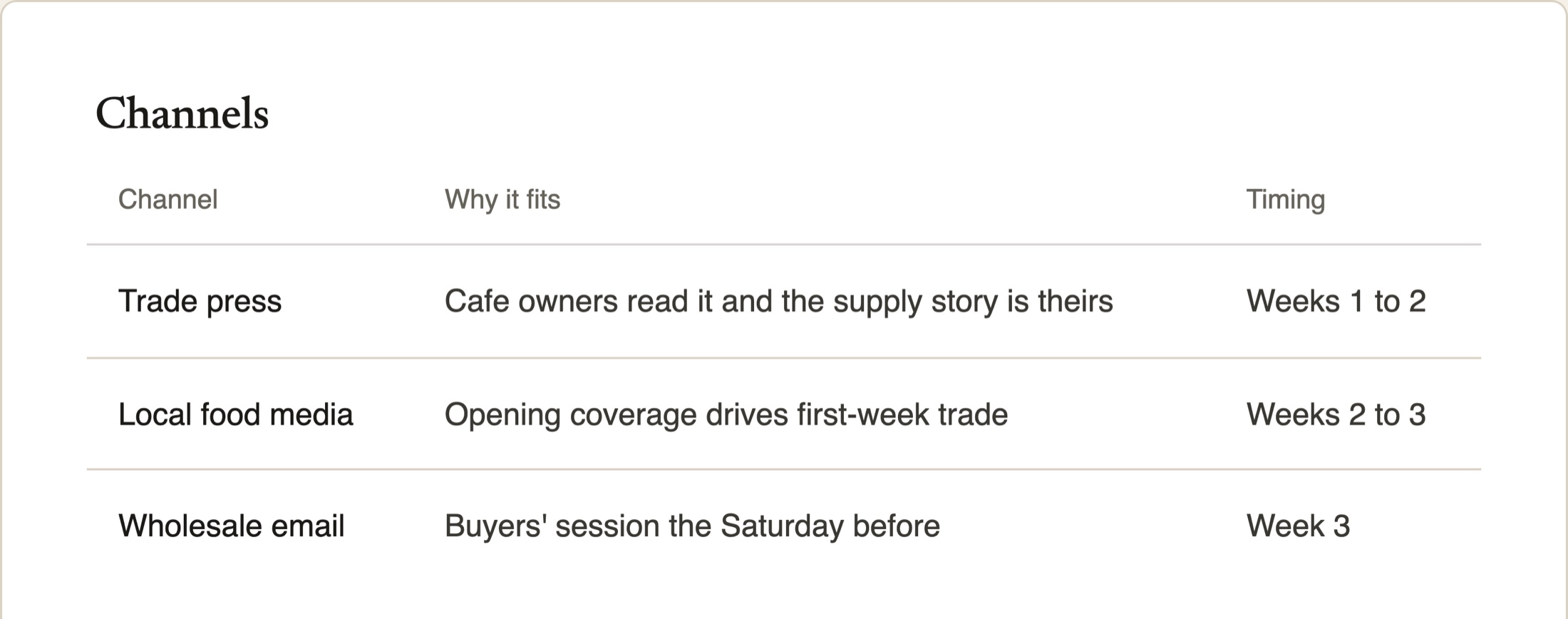
Communications CampaignFrom one brief to strategy, messaging, a channel plan and a timeline.4 steps
- Campaign brief
- Strategy & positioning
- Choose campaign channels
- Generate channel plans
Event PRObjectives, media strategy, invitation, run sheet and post-event coverage.9 steps
- Event objectives
- Media strategy
- Target audiences
- Media invitation
- Speaker profiles
- Event messaging
- Run sheet
- On-the-day media management
- Post-event coverage
CrisisAssess the issue, draft a holding statement, prepare your spokesperson and build a response plan.4 steps
- Assess the issue
- Draft a holding statement
- Prepare your spokesperson
- Build a media response plan
New ClientBusiness, brand voice, boilerplate, coverage, priorities, a first strategy and the first pitch windows.7 steps
- Business snapshot
- Brand voice & messaging
- Boilerplate & bios
- Media coverage
- PR priorities
- First PR strategy
- Map the first pitch windows
Monthly PR PlanningPriorities, announcements, industry events, opportunities and a content calendar.7 steps
- Client priorities
- Upcoming announcements
- Industry events
- News opportunities
- Content calendar
- Media targets
- Measurement goal
New Business & ProposalResearch, a proposed strategy and the pitch narrative for a prospect.6 steps
- Prospect & opportunity assessment
- Our differentiation & positioning
- Proposed strategy outline
- Proof points & case studies
- Pitch narrative & deck talking points
- Follow-up plan
Award SubmissionFrom criteria analysis to a judge-ready final edit.6 steps
- Award criteria analysis
- Story development
- Key achievements
- Draft submission
- Strengthen evidence
- Edit for judges
Creator CampaignObjectives, strategy, outreach and content planning for influencers, experts and newsletter writers.8 steps
- Campaign objectives
- Audience definition
- Creator strategy
- Creator criteria
- Outreach messaging
- Creator brief
- Content planning
- Campaign reporting
Personal BrandingPositioning, LinkedIn content, podcast guesting and opinion pieces for one person.4 steps
- Define your positioning
- LinkedIn content plan
- Podcast guesting
- Opinion pieces
Tools
One tool for each small job.
Open a tool when you need one thing done well. Each one writes in your client's voice and checks its own facts against what you gave it.
Create
- Pitch Builder
- Turn your story into a pitch journalists actually want to open.
- Follow-Up Strategy Builder
- Design multi-touch follow-up sequences that evolve your narrative and boost response rates.
- Social Post Builder
- Turn a placed feature or press hit into ready-to-post content for LinkedIn, Instagram, and more.
- Boilerplate & Bio Builder
- Write company boilerplates and executive bios, sized to where they'll be used.
- Case Study Builder
- Turn a client result into a structured case study: goals, strategy, and results.
- Brand Voice Guide
- Turn writing samples into a structured voice guide (tone, vocabulary, values) that every tool then writes in automatically.
- Press Release Builder
- Draft a complete, publish-ready press release: headline, dateline, lede, quotes, and boilerplate.
Improve
- Pitch Review Assistant
- Check a pitch against a named journalist's current beat and style, with a scorecard and rewrites.
Strategize
- PR Strategy Builder
- Build a PR strategy from the ground up. Analyze competitors, spot coverage gaps, and create targeted plans.
- Pitch Planning Strategist
- Map your brand to upcoming events, cultural dates, and seasonal trends. Get pitch timing windows.
- Thought Leadership Strategist
- Establish a brand or company's collective authority, one piece at a time: story ideas, op-ed opportunities, or a ready-to-pitch editorial.
- Media Angle Generator
- Generate up to 10 distinct story angles for an announcement or existing pitch: trend, data-led, founder, consumer, newsjacking, and more.
- AI Visibility Strategist
- Plan how this client shows up when people ask ChatGPT, Gemini, or Perplexity about their category: gaps to close, prompts to test, coverage to earn.
Research
- Coverage Watch
- Scan for brand mentions and competitor activity, or catch a breaking story and turn it into a rapid-response pitch angle.
- Journalist Research Assistant
- Live research on a real, named journalist's actual current beat and coverage: what they value, what kills a pitch, and how to prep for a call.
- Award & Speaking Opportunity Finder
- Find real, current award submissions and conference speaking opportunities that fit.
Prepare
- Client Meeting Prep Assistant
- Turn meeting notes, campaign status, and recent coverage into a ready-to-use client meeting brief.
- Crisis Statement Builder
- Draft holding statements and crisis responses, calibrated to the situation.
- Spokesperson Prep
- Anticipated Q&A, bridging statements, and a live practice interview before you go on record.
Measure
- Outcomes Insights Assistant
- Analyze what's actually worked for this client: angles, coverage patterns, and what to repeat next time.
PR Advisor: ask a question about a client or a campaign from any screen, and get an answer that uses their profile.
For teams
Built for one person, ready for a team.
Start on your own. When a colleague, a freelancer or an agency joins, everyone works from the same clients, voice profiles and campaigns.
Invite your team. Everyone signs in with their own login, so you can always see who changed what.
Shared clients. One set of clients, voice profiles and plans that everyone on the team works from, so a colleague can pick up where you left off.
One plan, one bill. Billed to the organisation, managed by your admin.
Working with a freelancer or a client? Invite them to a single campaign. They see only that campaign.
Questions
Do I need a card to start?
No. Every plan starts with 7 days free and no card. Cancel anytime from your account menu.
I'm the only PR person at my company. Is this for me?
Yes. It was built for that. You set up your company once, and each pitch, release and plan starts from your voice, your boilerplate and your key messages.
Can my team use one account?
Yes. Create an organisation and invite your colleagues. Everyone signs in with their own login and works from the same clients, voice profiles and campaigns, billed to the organisation.
Is the writing ready to send as it is?
Treat it as a strong first draft. Check facts, names and anything sensitive before it goes out, the same as you would for a junior colleague's work. Where a fact is missing, the draft marks the gap in capitals and lists it for you.
Is my data shared with other customers?
No. Each client's profile and work belongs to your account or organisation only. Nothing is shared across customers.
Try it on your next campaign.
Set up one client, run one workflow and see the plan appear in your campaign.
7 days free. No card needed.